Why Traditional Reporting Falls Short for Team
Power users see the best outcomes from AI, because they know how to prompt, iterate, and stitch results together. Everyone else opens the tool and gets something mediocre, then moves on. The tools simply weren’t built with everyone in mind.
That’s the challenge Slackforce helps solve: Slack and Salesforce working as one, so you don’t need to be a power user to get a real result. Slackforce Surfaces makes it easy for anyone to build. Ask Slackbot for a dashboard, a report, a deck, a poll, a calculator, even a microsite, and it figures out the right output for what you’re trying to create, then builds it on the spot.
Key Features of Slackforce Surfaces
Each of these features are Slackforce in practice: Salesforce data put to work inside Slack, instead of a system where you have to leave to get things done. And it’s not limited to Salesforce, you can build on data from any system connected to Slack.
It’s grounded in what’s real. A Surface pulls from your actual conversation and the systems connected to Slack. It shows its sources too, so nobody’s stuck arguing about where a number came from.
It stays live (coming soon). Most things you build manually are true the moment you finish them and out of date a day later. A Slackforce Surface stays wired to its sources, so it catches up automatically instead of requiring numerous rebuild.
Everyone can build. Building a dashboard or an exec-ready deck sometimes involved putting in a request and waiting your turn. Here there’s no analyst, no designer, and no waiting.
It helps the whole team. Pin a Slackforce Surface to a channel and it becomes something the whole team filters, comments on, and works from at the same time, instead of a file one person hands off.
We handle millions of customer inquiries a year, so getting our people the right context fast is important. Slack Surfaces helps anyone on the team describe what they need and get a real, working interface back and built from data we already have.
Real-World Examples: How Teams Use Slackforce Surfaces
No matter the team, department, or specific ask, Slackforce Surfaces make it easy for teams to build from a simple prompt in Slackbot.
Turning a pipeline into a daily view a rep actually opens
A sales rep turns their pipeline into a daily, prioritized view, customized with their favorite space theme. Every deal shows up as its own object, moving at a speed that reflects how it’s actually trending, so stalled or at-risk deals stand out immediately instead of getting buried in a spreadsheet.
Turning a GTM doc into a leadership-ready deck
A marketer turns their go-to-market plan into an executive presentation to give leadership the right story and visibility. Ahead of a launch, they gave Slackbot the GTM document, and it came back in the channel with pilot proof points, targets, and specific sign-offs leadership needed, all built into one interface and ready for approval.
Surfaces shift what it means to build in Slack. I stumbled onto Surfaces by accident, and within a week it changed how 21b shares metrics internally. No more decks or exports, just live interactive views right in the channel where the conversation is happening.
Catching AI spend before it becomes a surprise bill
An IT team wanted to keep an eye on AI adoption and token usage without it piling up unnoticed. With a Slackforce Surface tracking spend and ROI, a fresh version lands in Slack automatically, so they can catch runaway usage early instead of getting hit with a surprise bill later.
Turning a support queue into a live triage board
A service leader turns their support queue into a live triage board, surfacing SLA breaches, case severity, and customer tier the moment they matter, so the board replaces the status update someone used to have to chase down.
Slack Surfaces are one of those features that make you think, 'Oh, we can build THAT in Slack?' Turning data into a beautiful, interactive interface the whole team can act on is a game changer.
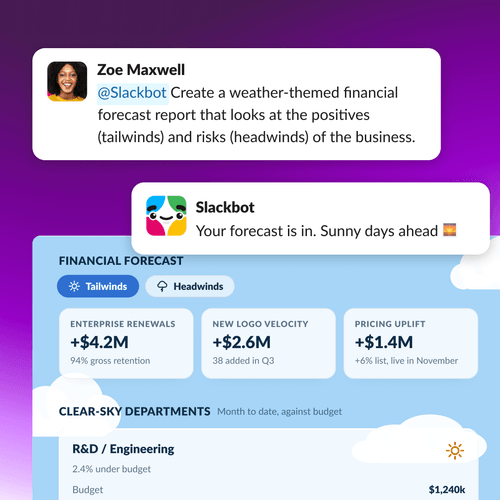
Making an financial forecast readable in seconds
A finance leader wants to turn a financial forecast report into something leadership can read in seconds. In this example, they create a weather-themed Slackforce Surface that looks at tailwinds and headwinds, showing the positives and risks side by side. It’s built from budget and variance data, so it’s ready to put in front of leadership without a second look.
Slack Lists at scale, plus Surfaces to visualize it — that's the future of work management. Our customers are proving it by eliminating other tools entirely, no BI team required.
See for yourself
Pick something you already have to explain to someone else this week — a pipeline update, a status report, a rough plan — and ask Slackbot to turn it into a Slackforce Surface. Open Slackbot and just say, “Create a surface report for…”
 Awesome!
Thanks so much for your feedback!
Got it!
Thanks for your feedback.
Oops! We're having trouble. Please try again later!